 By
By 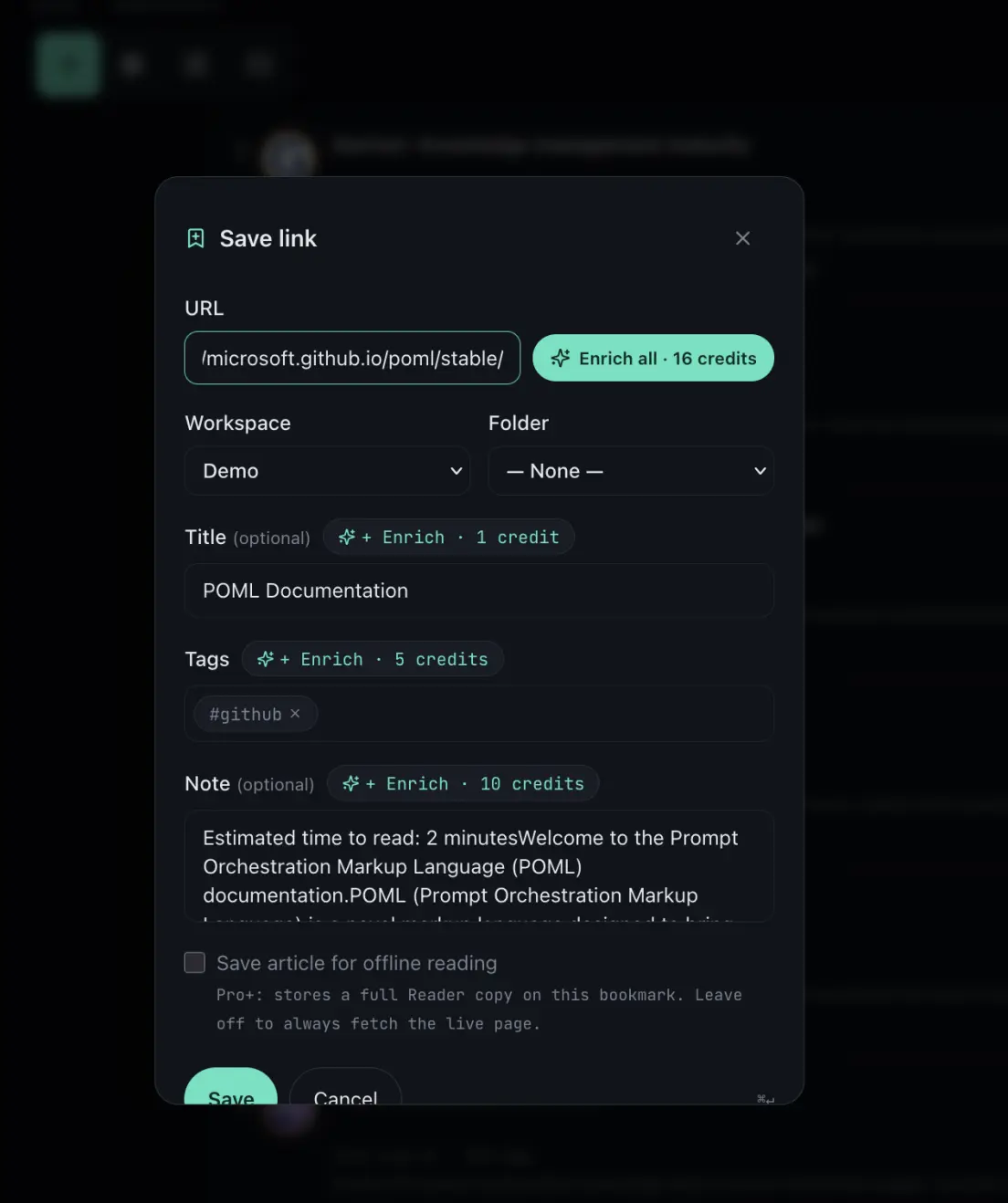
Most bookmark managers tag a saved page from its URL. The domain becomes the tag, and the actual content of the page is ignored. I built not24get to do the opposite: the AI reads the page and tags it from what the page says. This article walks through what the AI reads, what enrichment costs in credits, what happens at the credit limit, and how the same enrichment runs through the public API.
What the AI reads
Enrichment starts from the Save link dialog, the same dialog the browser extension opens. Each field has its own Enrich action, and an Enrich all action covers every field at once. The AI reads the content of the bookmarked page, scoped to that page's host. From the content it produces three things: a concise title, three to five short topic tags, and a two to four sentence summary that lands in the note field.
Nothing is written until the save is confirmed. The dialog shows the enriched values first, so a wrong guess is caught before it reaches the workspace. As a result, the bookmark that gets stored is the one the user approved, not the one the model imagined.
Tags from content, not from the domain
Every save in not24get also gets a free URL-based auto-tag when no tags are given. It comes from the hostname: a link to docs.github.com becomes github. It costs nothing and it runs regardless of plan. However, a hostname says where a page lives, not what it is about.
The difference shows up on real pages. Take the POML documentation hosted on GitHub Pages. The URL auto-tag stops at github. The AI tags name the actual topics: prompt engineering, markup language, language models. The table below puts the three approaches on the same axes.
| Approach | Where tags come from | What a tag looks like |
|---|---|---|
| not24get AI content tags | The text of the saved page, read by the AI | prompt engineering, markup language |
| not24get URL auto-tag | The hostname of the link, free on every save | github |
| Raindrop / Pocket | Page metadata and domain-level suggestions | Broad category labels, or manual tagging |
Content understanding is where not24get parts ways with Raindrop and Pocket. A tag that names the topic is searchable in a way a domain never is. The comparisons hub tracks this difference tool by tool.
What enrichment costs
Each enriched field has a fixed price in AI credits:
- Title: 1 credit
- Tags: 5 credits
- Note (summary): 10 credits
- Enrich all: 16 credits, the three fields together
Credits are debited on success only. A failed read, an empty result, or a rejected URL costs nothing. The Pro plan includes 200 AI credits per billing period, which covers roughly twelve full enrichments or forty tag runs.
What happens at the credit limit
The limit is checked before any work starts. When the remaining budget cannot cover a request, the API declines it with a plan_limit_exceeded error and debits nothing. Nothing is partially written either: the bookmark keeps its existing title, tags, and note.
Saving still works at the limit. The bookmark is stored, and the free URL auto-tag applies as usual. The credit budget resets with the next billing period, so enrichment picks up again without any manual reset.
When a page cannot be read
Some pages refuse to be read. Sign-in walls, bot protection, and plain timeouts all happen. In those cases the enrichment request fails with a clear error, such as enrichment_source_blocked or enrichment_upstream_timeout. No credits are debited, and no AI tags or summary are written. Tagging by hand, or trying again later, remains an option.
The same enrichment over the API
AI tagging is not locked inside the dialog. Two public endpoints expose the same pipeline: POST /bookmarks/enrich-preview enriches a URL before it is saved, and POST /bookmarks/{id}/enrich re-enriches a bookmark that already exists. Both accept an optional list of fields, and both follow the same credit rules. Programmatic re-enrichment and external AI pipelines work today; the developer documentation has the details.
Search picks it up
Enrichment writes the title, tags, and note straight onto the bookmark. The full-text search index covers exactly those fields, so an enriched bookmark is searchable the moment it is saved. Search by the AI tag, or search by a phrase from the summary. Both land on the same bookmark.
Common questions
What does AI tagging read in not24get?
The AI reads the content of the bookmarked page, scoped to that page's host. From the content it produces a concise title, three to five short topic tags, and a two to four sentence summary. It does not guess tags from the domain name.
What happens at the AI credit limit?
The request is declined before any work starts and no credits are debited. The bookmark still saves, and the free URL-based auto-tag applies as usual. The credit budget resets with the next billing period: 200 credits on the Pro plan.
Save a link and let the page tag itself. Try not24get.me.